

1. The Silent Problem: Reps Waste Time Guessing Time Zones
Salesforce is built to help teams work smarter, faster, and more efficiently. But there’s a surprisingly common productivity drain that almost every sales and support team experiences — and most admins don’t even realize it’s happening.
Reps spend an enormous amount of time guessing or checking a customer’s local time.
Every day, across thousands of Salesforce orgs, reps:
- Google “current time in Denver”
- Ask teammates “Is Arizona on DST right now?”
- Call prospects too early or too late
- Hesitate to dial because they’re unsure of the time zone
- Waste minutes per call trying to figure out the right moment to reach out
Individually, these moments seem small. But across a team — and across a year — they add up to hours of lost productivity and countless missed opportunities.
The worst part? This problem is completely invisible until you measure it.
2. Why Spreadsheets and Google Searches Don’t Scale
When teams are small, manual time‑zone checking feels manageable. But as soon as you’re working across multiple regions, the cracks start to show.
Problem 1: It’s slow
Even a quick Google search takes 10–20 seconds. Multiply that by 50 calls a day, and a rep loses 15–20 minutes daily just checking time zones.
Problem 2: It’s error‑prone
Reps often miscalculate:
- Daylight Savings Time
- International offsets
- Regions that don’t observe DST (e.g., Arizona, parts of Australia)
- Countries with half‑hour or quarter‑hour offsets
A single mistake can lead to a poorly timed call — and a lost opportunity.
Problem 3: It breaks reporting and automation
If reps don’t know the customer’s local time:
- They can’t prioritize call lists
- They can’t schedule follow‑ups intelligently
- Automations fire at the wrong time
- Managers can’t build accurate dashboards
Salesforce becomes less effective simply because it lacks one key piece of information.
3. How Salesforce Can Automate This
The good news is that Salesforce can handle time zones — it just needs the right data.
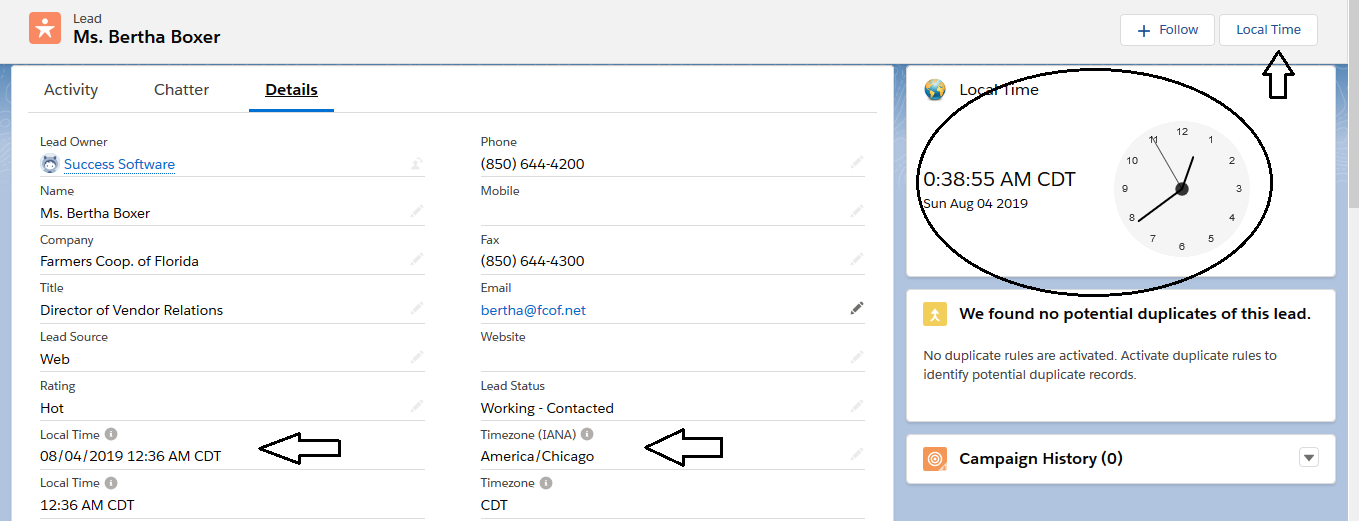
With the Local Time app, admins can automatically add:
- A Local Time field
- A Time Zone field
- A UTC Offset field
- A DST‑aware calculation
- A Lightning component showing the current time
This works for:
- Leads
- Contacts
- Accounts
- Cases
- Opportunities
And because it requires no Apex, no external APIs, and no maintenance, it’s one of the simplest improvements an admin can make.
What this unlocks
Once Local Time is available, teams can:
- Sort call lists by local time
- Build “Call Now” dashboards
- Trigger Flows only during business hours
- Route leads based on customer availability
- Improve connect rates
- Reduce after‑hours outreach complaints
It transforms Salesforce from a generic CRM into a time‑zone‑aware productivity engine.
4. The ROI of Fixing This
Time zone guessing seems small, but the impact is huge.
A. Higher connect rates
Calling at the right time can increase connect rates by 30–50%.
B. More calls per rep
Removing manual time‑zone checking saves 15–30 minutes per rep per day.
C. Better customer experience
Customers appreciate calls during reasonable hours — and remember when they’re not.
D. Smarter automation
Flows, assignments, and reminders become more accurate and more effective.
E. Happier reps
Reps love tools that remove friction. Admins love tools that reduce support tickets. Managers love tools that improve performance.
Everyone wins.
5. Try Local Time Free for 30 Days
Time zone guessing is one of the most overlooked productivity killers in Salesforce — but it’s also one of the easiest to fix.
The Local Time app gives your team:
- Instant visibility into customer local time
- Accurate, DST‑aware calculations
- List view support
- Lightning components
- Flow‑ready fields
- Zero maintenance
Install it from the AppExchange and try it free for 30 days. Setup takes less than 5 minutes, and the impact is immediate. Follow the steps described in the installation and setup guide.