
Please visit the listing on Salesforce AppExchange by clicking the following link, and then select Get It Now button to install and get started with Local Time App for Salesforce.
Category Archives: Local Time
Request Free Trial
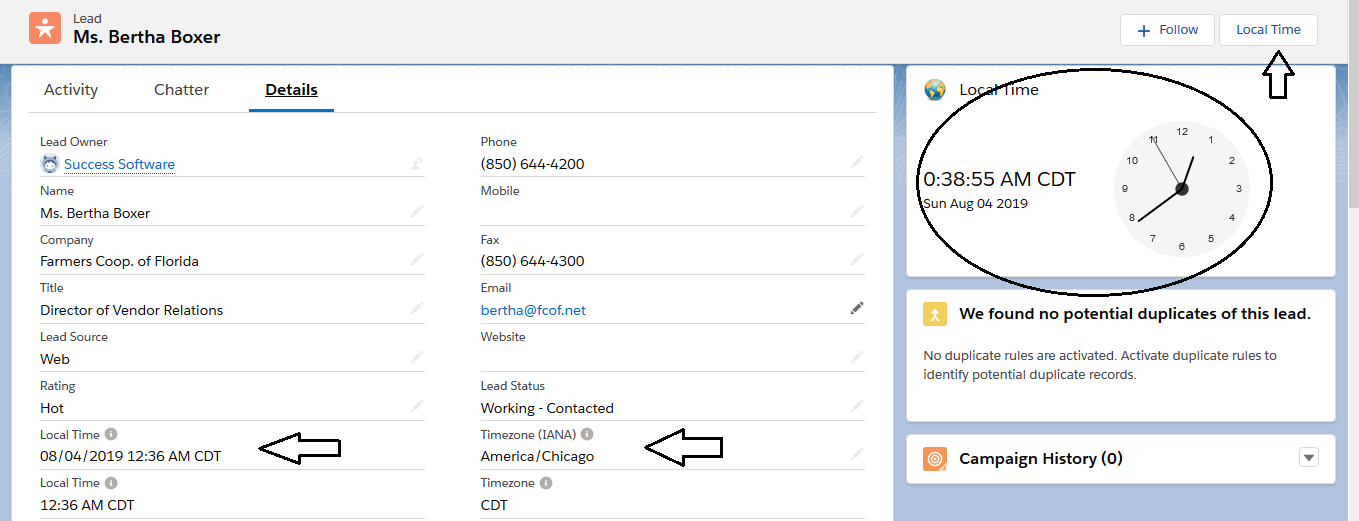
The Local Time App enables a Salesforce user to easily find the local time in a destination country.
Key Benefits:
- Instant access – no need to go to another website and manually enter the city or country name to get the local time.
- Saves you time when calling daily 100’s of prospects located all around the world.
- Helps you prioritize your calling schedule so that you can reach the prospects most effectively.
- Supports Daylight Saving Time (DST) – So you get the most accurate local time when countries change the clocks.
- Secure – 100% native Salesforce app and does not rely on any external sources.
Free Trial:
Start using the App right away by following the steps described in the installation and setup guide.
Local Time for Salesforce v1.18 Released

Easy Access To Global Time Zones!
Success Software is pleased to announce the release of version 1.18 of the Local Time Application for Salesforce.
Local Time helps you spend less resources in finding time zone information and gives you instant access to your prospect’s local time easily from the Accounts, Leads, Contacts, Opportunities, and Cases pages.
What’s New?
In release v1.18, the App also supports phone numbers (US and Canada only) to get local time information. Thus if the record has incomplete information, the App will use the record’s phone number field instead to compute the local time.
We hope that the Salesforce users will find this new enhancement very helpful. We look forward to your feedback and comments!
Request a free trial today!
Kind regards
Success Software
Local Time for Salesforce v1.8 Released
Easy Access To Global Time Zones!
Success Software is pleased to announce the release of version 1.8 of the Local Time Application for Salesforce.
Local Time helps you spend less resources in finding time zone information and gives you instant access to your prospect’s local time easily from the Accounts, Leads, and Contacts pages. In release v1.8, Salesforce developers can also make API calls from their custom applications to get local time information.
We hope that the Salesforce users will find this new enhancement very helpful. We look forward to your feedback and comments!
Request a free trial today!
Kind regards
Success Software
Local Time App for Salesforce

Easy Access To Global Time Zones!
Spend less resources in finding time zone information.
Get instant access to your prospect’s local time easily from Accounts, Contacts, Leads, Cases, and Opportunities pages.
MINIMIZE time on routine tasks so you can MAXIMIZE it with your prospects!
The Local Time App is created for Salesforce users and it enables them to easily find the local time in a destination country by the following options:
- Local Time Custom Field – can be placed both in a detail page layout and list views.
- Local Time Lightning Action – can be placed in a detail page layout.
- Local Time Lightning Component – can be placed in a detail page layout.
The App supports local time for the standard objects: Accounts, Contacts, Leads, Cases, Tasks, and Opportunities. However, you can use the App’s API to show Local Time on other standard and custom objects.
Salesforce Lightning Experience Detail Page Layout
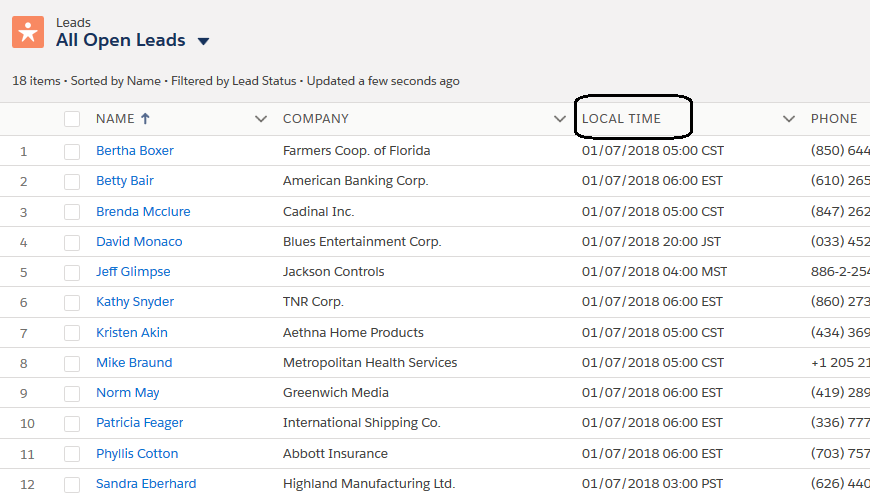
Furthermore, the Local Time custom field can be added to the List Views – thus enabling your sales, marketing and support employees to easily prioritize their call lists or support cases based on the local time.
Finally, advanced users can also make API calls from their Apex based applications to fetch the local time.
The application helps companies who reach international prospects on a regular basis and who need to know the correct local time in an easy manner.
Key Benefits:
- Instant access – no need to go to another website and manually enter the city or country name to get the local time.
- Saves you time when calling daily 100’s of prospects located all around the world.
- Helps you prioritize your calling schedule so that you can reach the prospects most effectively.
- Targeted Marketing – The Local Time and UTC Offset custom fields help Marketing Automation Systems to launch more targeted campaigns.
- Supports Daylight Saving Time (DST) – You get the most accurate local time automatically when countries change the clocks.
- Flexible – Calculates time using the record’s address field, and if this field is empty or incomplete, uses the phone number field (supports USA/Canada and many international dialing codes around the world).